Evergreen
Green is the color your eyes evolved for: humans can distinguish more shades of green than of any other color, a souvenir from a very leafy past. It means growth, permission, and calm all at once: nature's color, and also the color of "go." A green background is restful in a way no other saturated color manages. Below: ready-to-download green backgrounds, the shades and codes to build your own, and the story behind the color.
Green color codes
Gallery
A sample of ready-to-use green backgrounds. Hover any image and hit the download button to grab the full-resolution version.
Ways to use a green background
- Wallpaper: a deep green wallpaper is the most restful choice here: forest calm for a desktop or phone. Every image above downloads at full resolution.
- Plain & solid: green flatters anything natural (food, plants, skincare), and one specific green runs the entire visual-effects industry; grab an exact shade below.
- Web & design: green is the yes color: success states, confirm buttons, "in stock," "online now." Users read green as permission before they read the label.
Shades of green
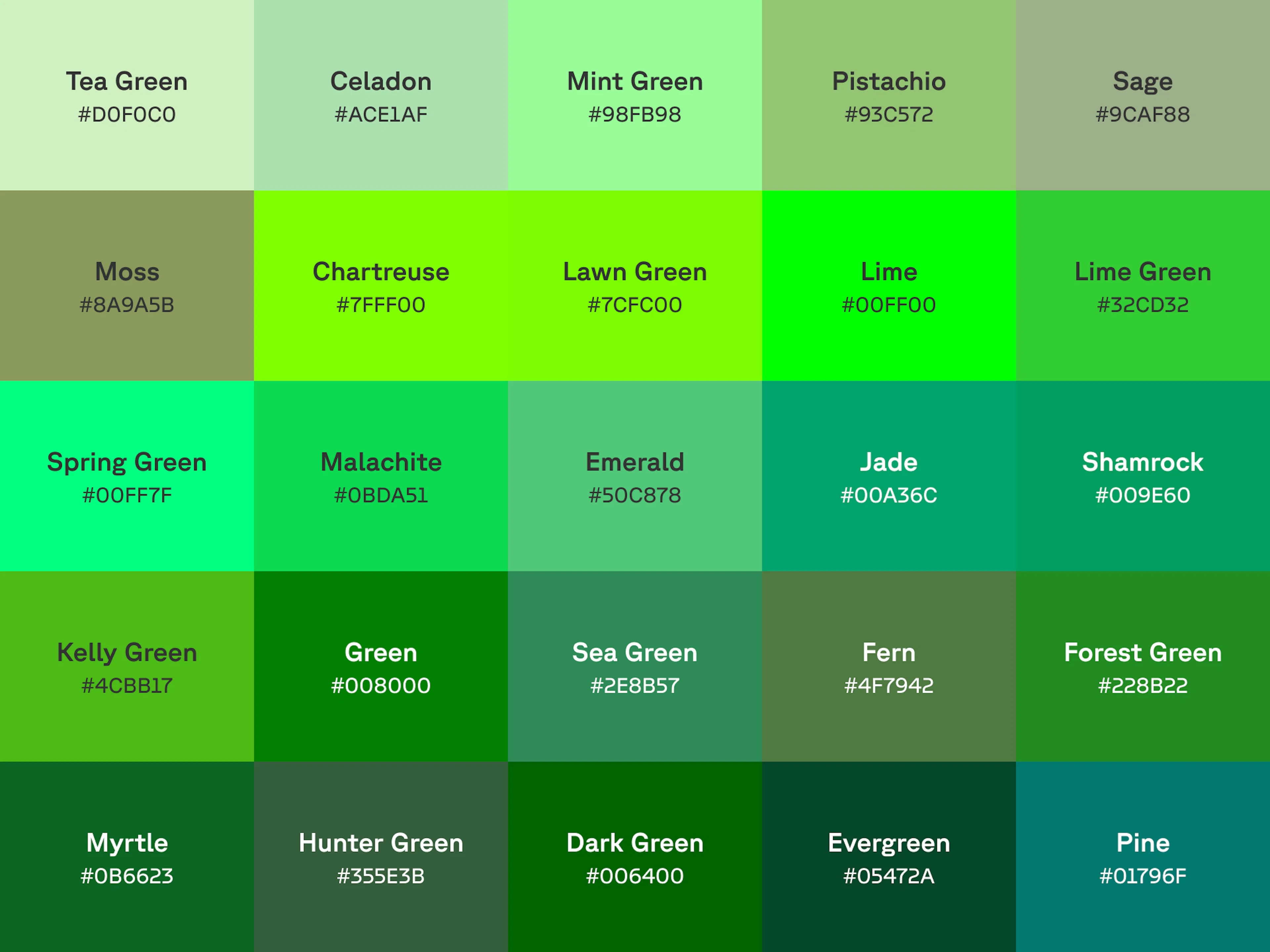
Green's range is an entire landscape. The light end (tea green, celadon, mint) is airy and fresh. The electric middle holds lime, chartreuse, and spring green: greens with neon in their veins, including the pure #00FF00 of green-screen fame, chosen because it's the color furthest from human skin tones. Then the deep end: emerald, forest, hunter, and evergreen, the greens of money, wilderness, and old libraries.
Click a shade to copy its hex code, or download it as a ready-to-use background:
The quiet greens are the designer's secret: sage, moss, and fern behave almost like neutrals while keeping a pulse. They're why 'earthy' interfaces feel expensive.
Want even more? Explore the full shades of green collection.
Green gradient backgrounds
A green gradient reads like light through a canopy. Here are six ready-made green gradients. Copy the CSS straight into a stylesheet, or download the full-resolution image. Want to build your own? Open CSS Gradient and roll a custom green.
What green means
Green means life, luck, and permission, with a jealous streak.
Growth, go, and money
Green is the most literal color in the palette: it means the plants are alive, the light says proceed, and the numbers are up. Finance borrowed it for gains, UX borrowed it for success states, and sustainability borrowed it for everything. "Green" stopped being just a color decades ago and became an adjective for an entire way of operating.
Cultural significance of the color green
Green is sacred in Islam and national in Ireland; it's the color of luck (shamrocks), envy (the green-eyed monster is Shakespeare's), and inexperience (greenhorns). Theaters have green rooms, environmentalists have green parties, and the U.S. put green on the dollar largely because the ink was durable and hard to counterfeit; the color then became shorthand for money itself.
History of green
Painters struggled with green for centuries: the good pigments were fickle and the vivid ones were dangerous. Verdigris, scraped from corroded copper, was medieval Europe's brightest green and its least stable. Then the 18th and 19th centuries delivered Scheele's green and Paris green: gorgeous, cheap, and loaded with arsenic. They colored wallpaper, dresses, and candy; damp Victorian rooms slowly poisoned their occupants, and one theory holds that Napoleon's exile wallpaper contributed to his death.
Modern green got safer and then got busy: chlorophyll became the emblem of the environmental movement, and pure #00FF00 became the invisible workhorse of cinema, the green screen on which half of Hollywood is now built. The color of nature ended up powering the most artificial images ever made.
Colophon
While Cool Backgrounds is a fine resource for generating images from popular javascript libraries, the real heavy lifting comes from the library authors themselves. When it comes to customer support, Quinn Rohlf from Trianglify.js is incredibly responsive and a really smart guy to boot. Particle.js is developed by Marc Brüderlin with a wonderful API and is being actively maintained. Gradient Topography is a newly minted project by me as a response to the amazing work by the Codrops crew. And of course Unsplash is one of the best internet treasures of all time, built by the former Crew team as a side project.
Oh yea and can’t forget CSS Gradient and Rellax.js which is the “cool background” that powers those sliding parallax shapes in the content section of this site!