The Gray Area
Gray (or grey; both are correct, though American English leans gray) is the great neutral. It's concrete and silver, fog and flannel, the color that makes every other color look better by staying out of the way. A gray background is the most versatile choice on this site: calm, professional, and impossible to clash with. Below: ready-to-download gray backgrounds, the shades and codes to build your own, and the story behind the color.
Gray color codes
Gallery
A sample of ready-to-use gray backgrounds. Hover any image and hit the download button to grab the full-resolution version.





Ways to use a gray background
- Wallpaper: a soft gray wallpaper is the easiest on the eyes of any color here: calm on a desktop, elegant on a phone. Every image above downloads at full resolution.
- Plain & solid: the professional standard behind product photos and portraits, neutral enough to flatter anything placed on it; grab an exact shade below.
- Web & design: gray is the workhorse of interface design: text, borders, dividers, disabled states, dark-mode surfaces. Get your grays right and the whole UI feels considered.
Shades of gray
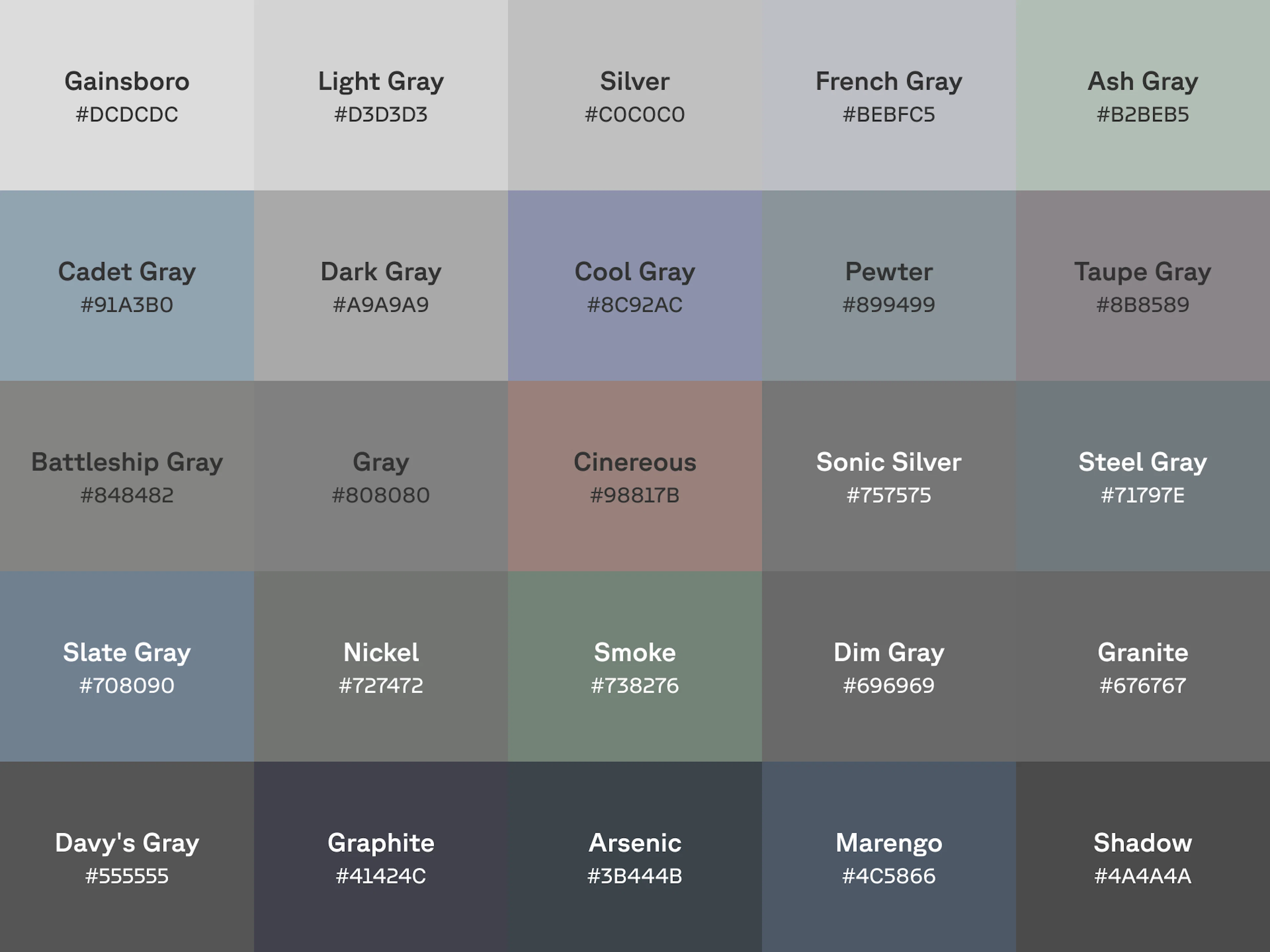
Gray has more personality than it gets credit for. The light end (gainsboro, silver, ash) reads as airy and clean. The middle grays are where the character lives: slate and steel carry a blue undertone, pewter and nickel stay industrial, cinereous drifts warm. At the dark end, graphite and arsenic shade toward charcoal without going black.
Click a shade to copy its hex code, or download it as a ready-to-use background:
Undertone is what matters with gray: warm grays (a touch of brown) feel human and soft; cool grays (a touch of blue) feel technical and precise. Pick one temperature and stay with it. Mixing warm and cool grays is the fastest way to make a clean layout feel subtly wrong.
Gray gradient backgrounds
A gray gradient is light on fog, the subtlest depth a background can have. Here are six ready-made gray gradients. Copy the CSS straight into a stylesheet, or download the full-resolution image. Want to build your own? Open CSS Gradient and roll a custom gray.
What gray means
Gray is the color of neutrality, and neutrality means more things than you'd expect.
The professional neutral
Gray is gravitas: the flannel suit, the silver watch, the granite institution. It signals seriousness without aggression, which is why banks, law firms, and luxury carmakers all reach for it. In photography and design it's the standard of standards: the 18% gray card that cameras are calibrated against is literally how the industry defines correct exposure.
Cultural significance of the color gray
Gray is the color of wisdom and age (gray hair has meant experience in nearly every culture) and also of ambiguity: gray areas, gray markets, gray skies. It can read as gloom (ask anyone in Seattle come November) or as sophistication (ask anyone in a Milanese tailor shop). Few colors swing so far on context alone, and that's what makes gray such a precise design tool: it means whatever the colors around it need it to mean.
History of gray
Gray's story in art is a story of restraint. Medieval and Renaissance painters developed grisaille, entire scenes painted only in grays, sometimes as underpainting and sometimes as finished work imitating stone sculpture; the technique still stares down from cathedral windows and Ghent Altarpiece panels. Later, watercolorist William Payne mixed a soft blue-gray so useful it still bears his name: Payne's gray sits on palettes today as the painter's alternative to harsh black.
The modern world made gray its own: newsprint gray, concrete gray, silver-screen gray. For most of the 20th century the movies were literally gray, every performance and landscape rendered in nothing but its tones. Proof that the "neutral" color can carry an entire art form.
Colophon
While Cool Backgrounds is a fine resource for generating images from popular javascript libraries, the real heavy lifting comes from the library authors themselves. When it comes to customer support, Quinn Rohlf from Trianglify.js is incredibly responsive and a really smart guy to boot. Particle.js is developed by Marc Brüderlin with a wonderful API and is being actively maintained. Gradient Topography is a newly minted project by me as a response to the amazing work by the Codrops crew. And of course Unsplash is one of the best internet treasures of all time, built by the former Crew team as a side project.
Oh yea and can’t forget CSS Gradient and Rellax.js which is the “cool background” that powers those sliding parallax shapes in the content section of this site!